


Minutes: AI Meeting Note Taker
4.158.00 Reviews
App Specs
- Version
- 1.4.0
- Updated On
- License
- Free
- Downloads
- 100,000+
- Developer
- Minutes AI
- Categories
- Productivity
- Platform
- Android
Screenshots
 Analysis by AppCompare
Meeting notes become difficult to trust when you are trying to listen, contribute and write at the same time. Minutes: AI Meeting Note Taker is a productivity app from Minutes AI that aims to take some of that pressure off by recording voice audio and turning conversations into text. I find the idea appealing for the moments when a useful detail is easy to miss, though an automatic transcript still needs a human check before I would treat it as a definitive record.
Where the first snags can appear
The basic promise sounds simple, but meeting capture depends on the circumstances around the conversation. If people speak over one another, sit far from the recording device or use unfamiliar names and specialist terms, the resulting text can be harder to follow. Speaker labels and suggested key points can help with review, but they do not remove the need to check who said what or whether an important phrase was heard correctly.
I would treat the transcript as a working draft rather than a verbatim account. That distinction matters most when the discussion includes deadlines, figures, decisions or commitments. A quick review while the meeting is still fresh lets you correct a misheard name and distinguish a final decision from an idea someone merely floated.
There is also a social side to recording. Before using any recording tool in a meeting, I would tell the people involved and follow the expectations that apply in that workplace or setting. That keeps the process clear and helps avoid an awkward surprise, particularly on a client call or a conversation involving sensitive subjects.
Small checks that make a session easier
Minutes is free to download and is rated for Everyone; its current version is 1.3.3, and it requires Android 7.0 or later. Its average rating is 4.3 from around 2,800 ratings, with over 100,000 installs. Those figures suggest it has found an audience, but they cannot tell you whether it will suit your meeting style or recording environment.
Before relying on it for a meeting you cannot repeat, I would open the app ahead of time, check that I can start a recording and confirm that the device is positioned to pick up the people speaking. For a remote call, the important practical question is whether the audio reaching the phone or device is clear enough for the app to work with. A short test in the same setup can reveal problems before the conversation matters.
The app’s calendar connection may help fit capture into an existing routine, but I would still check the session itself rather than assume a scheduled event means everything is ready. Keeping a meeting title or a simple note about the date and participants can also make later review less confusing when several conversations cover similar topics.
Worth Reading Before You Choose

EA SPORTS FC Mobile 26 Is a Bigger Football Game, but It Takes Time

Flipboard Shows What News Apps Must Do Beyond the Feed

Switching to Android Auto Means Rethinking Your Driving Routine

Google Calendar Makes a Crowded Week Easier to Manage

Ludo King Makes the Most of the Minutes Between Plans

Baby Panda World Brings Quick Play to Modern Phones, but Its Game Library Feels Busy
Recovering a useful record after the meeting
If a transcript looks incomplete, I would first work out whether the gap is in the recording or in the transcription. Replay the relevant portion if the app makes that possible, compare the wording with your own recollection, and correct only what you can confidently verify. If the audio itself missed a quiet speaker, no transcription tool can recreate those words reliably.
For action items, I find it safer to turn the transcript into a short, checked follow-up rather than send a long block of automatically generated text as if it were a polished set of minutes. Confirm the owner and next step for each task, and separate decisions from open questions. This small extra pass is where automated capture becomes genuinely useful: it preserves context, while your judgement supplies the meaning.
When another cause is more likely
A disappointing result does not always mean the app itself is at fault. Room noise, a device placed too far away, overlapping voices or a weak call signal can all make speech difficult to understand before transcription begins. I would try a quieter spot, move the device closer to the main speakers and avoid placing it beside distracting noise before deciding that the tool is unsuitable.
Likewise, an unfamiliar term may be recorded as a plausible but incorrect word. That is a common risk with automated speech recognition, especially in teams with internal shorthand, product names or mixed accents. Writing down a few essential terms during the meeting gives you a reference when checking the transcript afterward, without requiring you to take notes on every sentence.
The Magic of Automated Note-Taking
Right off the bat, Minutes: AI Meeting Note Taker impresses with its ability to seamlessly integrate into your meeting routine. You can connect it to your calendar, and boom, it’s all set to capture every word in your meetings. It’s like having your personal assistant who doesn’t need coffee breaks.
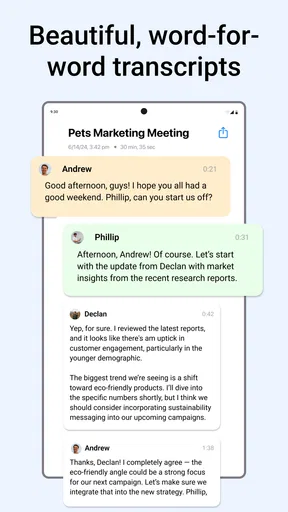
The app uses advanced AI to transcribe meetings in real-time, which is pretty neat. I was skeptical at first—after all, AI can sometimes misunderstand accents or jargon. But I was pleasantly surprised by its accuracy. It even includes speaker identification, so you know exactly who said what. No more guessing games!
Features That Stand Out
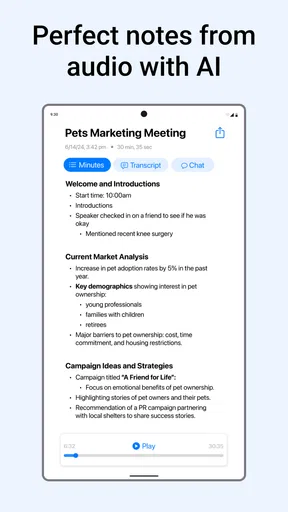
One of the standout features is the keyword extraction. Minutes doesn’t just transcribe; it picks out key points and action items, making it super easy to review what’s truly important. And if you’re like me, who loves everything organized, the app’s ability to categorize and sort notes is a dream come true.
The app also supports multiple languages, which is great for international teams. Plus, the interface is sleek and user-friendly. Even if you’re not tech-savvy, you'll find it easy to navigate.
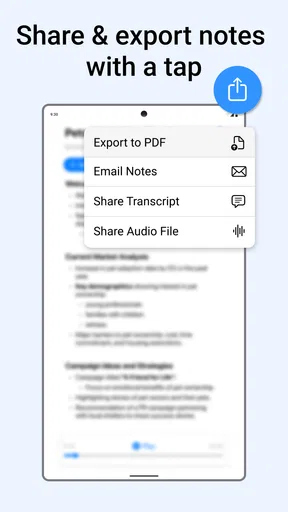
Another feature I found handy is the ability to share notes with team members directly from the app. You can even edit notes if you need to tweak something before sending them out. It’s a collaborative tool that makes sure everyone’s on the same page.
Security and Privacy
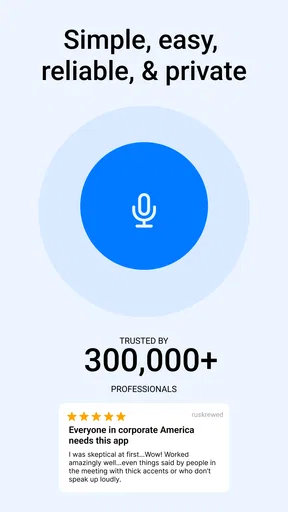
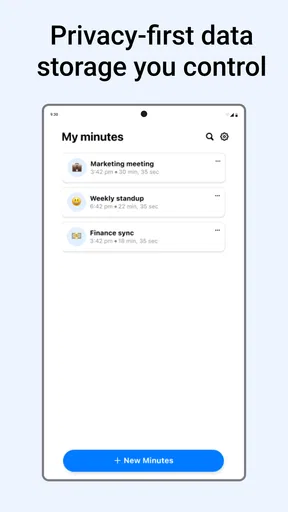
Now, I know what you’re thinking—what about security? Rest assured, Minutes takes this seriously. Your data is encrypted, and they have strict privacy policies in place. You can control who gets access to your notes, which gives you peace of mind.
Real-World Application
In practice, this app is a game-changer. I tried it during a brainstorming session and later during a client call. In both instances, it captured the essence of the conversation perfectly. Having a detailed transcript available immediately after the meeting felt like a weight lifted off my shoulders. I could focus more on engaging in the moment rather than scribbling notes frantically.
For remote teams especially, Minutes: AI Meeting Note Taker bridges the gap between virtual and in-person meetings, ensuring nothing gets lost in translation.
A practical fit for busy workdays
The clearest everyday use is a meeting where you need to participate rather than act as its secretary. Imagine joining a planning discussion, asking questions and helping shape a decision while the app captures the conversation. Afterward, you can check the extracted points against what the group actually agreed, then share a concise, edited record. That is more helpful than trying to reconstruct the whole discussion from hurried shorthand at the end of the day.
I can also see value for interviews, study groups or recurring project check-ins, provided everyone is comfortable with recording. For a student, the transcript can make it easier to revisit an explanation while studying; for a project lead, speaker identification and action items can help untangle who volunteered for what. In both cases, the practical benefit is not that the app makes judgement calls for you, but that it gives you material to review when your memory has started to blur.
A less obvious workflow is to use the extracted keywords as an index, not as a finished summary. Search or scan for the topic that matters, return to the surrounding conversation, and use that context to write your own follow-up. A keyword by itself can flatten nuance: “budget,” for example, might refer to a proposal, a concern or an agreed limit. Treating it as a pointer helps prevent a tidy-looking note from being mistaken for the whole story.
Choosing it over familiar alternatives
Compared with taking notes manually, Minutes can preserve more of the conversation while letting you stay engaged. The trade-off is that handwriting or typing a few selective notes can be faster to scan and easier to keep private in settings where recording is unwelcome. I would not replace a notebook for a short, informal chat that only needs one reminder; the capture and review process may be more effort than the task deserves.
It also occupies a different role from a plain voice recorder. A recording gives you the original sound to revisit, while transcription and extracted points are designed to make the content easier to navigate. The text is convenient, but it can mishear words; the audio may preserve what was actually said, but listening through a long session takes time. If accuracy on a critical detail matters, use the transcript to find the passage and verify it against the sound when available.
Against general-purpose transcription tools, its meeting-focused organization and action-item emphasis are the more relevant distinction. If you mainly need dictation for a personal memo, a simpler recorder or speech-to-text tool may be a better fit. If you need a formal, legally reliable record, I would not rely on an AI-generated transcript alone; use an approved process and have a person verify the final document.
Costs, audience and sensible boundaries
The app is free to start, with in-app purchases ranging from $14.99 to $99.99 per item. I would try the free experience on ordinary, low-stakes conversations before paying for anything, then decide whether its capture and review workflow saves enough time for my own routine. The existence of paid options does not, by itself, tell you which tier is necessary, so check the purchase details in the app before committing.
Minutes is most compelling for people who attend frequent discussions, need searchable records, or regularly turn conversations into next steps. It is less suitable for someone who rarely has meetings, prefers writing only a few personal reminders, or cannot record the people they speak with. It is also a poor substitute for a human note-taker when the discussion is highly sensitive or when every statement must be attributed and checked with care.
The developer is Minutes AI, and the app was released on January 15, 2025. That makes it a relatively recent option, so I would judge it by how reliably it handles my own devices, voices and meeting habits rather than assume every feature will behave identically in every environment. Its current rating gives a useful broad impression, but a short trial in the kind of room or call I actually use is a much better test.
The Verdict
All in all, if meetings are a big part of your work life, investing in Minutes: AI Meeting Note Taker is a no-brainer. It saves time, reduces stress, and ensures you have a reliable record of what transpired. It’s like having a superpower that transforms you into a meeting maestro.
So, whether you’re leading the meeting or just attending, give Minutes a try. It might just be the productivity boost you didn’t know you needed.
My practical verdict
I would recommend trying Minutes when the main problem is keeping up with spoken detail, especially if you can review and share notes soon after a conversation. Its real value lies in combining capture with a human check: let the app hold the thread, then verify names, decisions and responsibilities before anyone acts on them.
If your meetings are short, confidential, noisy or full of overlapping discussion, a different approach may be wiser. Keep brief manual notes, use a recorder only where appropriate, or choose a human-reviewed process for high-stakes material. For ordinary collaborative work, though, Minutes offers a useful way to be more present in the room without pretending that automated notes are infallible.
Pros
- Accurate transcription of meeting notes.
- Seamlessly integrates with calendar apps.
- Real-time collaboration features.
- User-friendly interface for easy navigation.
- Multi-language support for global teams.
Cons
- Occasional lag during busy server times.
- Limited features in free version.
- Requires stable internet connection.
- No offline mode available.
- Subscription can be pricey for small teams.
FAQs for Minutes: AI Meeting Note Taker
What is Minutes: AI Meeting Note Taker and how does it work?
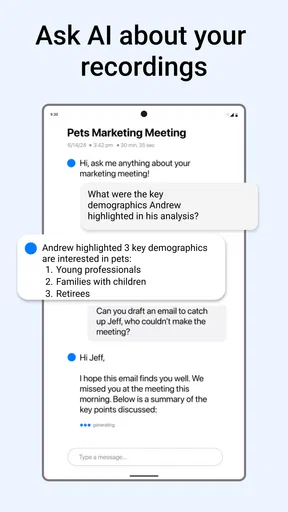
Minutes: AI Meeting Note Taker is an innovative application designed to automatically transcribe and summarize meetings using advanced AI technology. It records conversations, converts them into text, and generates concise summaries, making it easier for users to keep track of key points and decisions without the hassle of manual note-taking.
Is the Minutes app compatible with all meeting platforms?
Yes, Minutes is designed to be compatible with most popular meeting platforms such as Zoom, Microsoft Teams, and Google Meet. This ensures seamless integration and allows users to capture notes effortlessly regardless of the platform they use, making it a versatile tool for a variety of professional settings.
How secure is my data with Minutes: AI Meeting Note Taker?
The app prioritizes user privacy and data security. It employs encryption to protect your recordings and notes, ensuring they are only accessible to authorized users. Additionally, it adheres to strict data protection regulations, giving you peace of mind that your sensitive information is handled responsibly.
Can I customize the notes and summaries generated by Minutes?
Yes, the app allows users to customize their notes and summaries. You can edit the text to emphasize particular points or add additional information. This feature ensures that the final output meets your specific needs and preferences, enhancing the usability of the notes for future reference.
Does Minutes support multiple languages for transcription?
Minutes is equipped with multilingual support, allowing it to transcribe and summarize meetings in several languages. This feature makes it an ideal choice for international teams who work across different languages, ensuring that communication barriers are minimized and everyone stays on the same page.


